Remote Control Designs

ID 2012 B Function Project, Spring 2007
Overview and Preliminary Work

The goal of the Function project was to take a frustrating product and create three new designs to improve its usability. An interview with my father revealed some significant shortcomings in the usability of the remote control that came with my father's new DVD and VHS recorder. The remote combined controls for basic TV operations (channel, volume, etc.) as well as playback, recording, and programming of DVDs and VHS tapes. The existing remote design was a mass of small, mostly undifferentiated buttons, leading to a long seek time to find the appropriate button as well as frequent pressing the wrong one. All three designs made some use of gestalt theory (especially grouping and similarity) to help differentiate the buttons.
Design 1

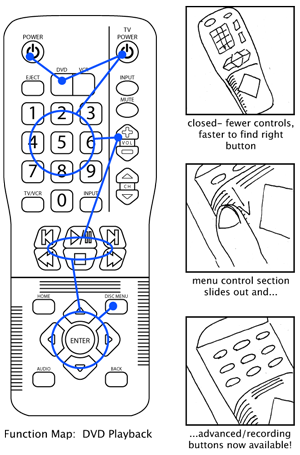 |
My first design sought to resolve the flexibility/usability conflict by hiding the programming buttons underneath a sliding cover. For general use, the programming buttons are hidden, only revealed when they will actually be used. Ribs are cut into the plastic perpendicular to the sliding direction, providing gripping affordances for sliding back the panel. This design also replaced the buttons for DVD/VCR selection with a slim switch that toggles between the two operational modes, giving visual and tactile feedback. |
Design 2


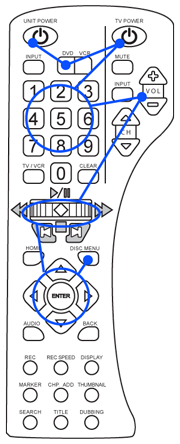 |
The central feature of this design was the multifunction wheel, similar to a joystick, that combined play, pause, stop, and multispeed fast forward and rewind into one simple control. This design also used the DVD/VCR toggle switch and used gestalt principles to separate buttons by functional group. Finally, the overall body of the remote has a concave right side to facilitate finger reach when operated with the right hand. |
Design 3

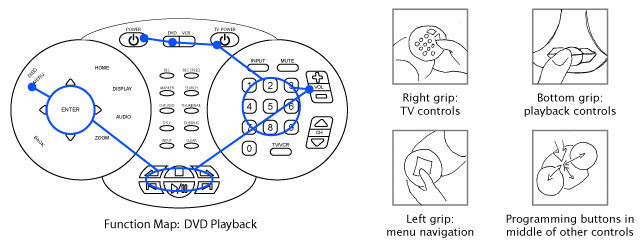
The third design went with a familiar layout not usually used for remote controls- the form factor of a game controller. The strength of most game controllers is that they allow a large number of buttons to be accessible simultaneously without moving hand positions. This design utilizes and modifies the idea, grouping functions at certain hand positions. The least used buttons, the programming controls, are placed in the middle of the remote, allowing more frequently used buttons to take priority positions as well as decreasing travel time between the programming controls and other control groups.
All site layout, graphics, and content © 2007 Jonathan Sheppard. Contact: shrakner2140@yahoo.com
This site is best viewed with Firefox or Safari.

